
The lowest headline fee isn’t always the best value. Compare sports activity staff scheduling software by weighing payment and roster integrations against the admin each option leaves behind. For a practical scheduling benchmark, publish staff rosters at least 14 days ahead and lock shifts 72 hours before they start.
A low price can look attractive, but disconnected booking, payment and staffing workflows may leave coaches coordinating changes across separate tools. This guide explains how to compare payment structures, roster connections, advance schedule lock-in and affordability for a small coaching programme, so you can judge options on more than their headline cost.
Compare what each price structure covers, including staff access, booking and payment workflows, and roster functions. Then weigh the ongoing cost against the time and coordination needed to keep sessions running smoothly. For a tailored platform, the price depends on your requirements and is provided after a quote request, with the cost shaped by the workflows and integrations needed.
Key Takeaways
- Compare the total admin involved, not just the headline fee: connected booking, payment and roster workflows can change the value of an option.
- Assess whether schedule changes are easy to make and communicate, especially when part-time coaches need timely updates.
- For a small coaching programme, focus on the functions you’ll use regularly and how the cost fits your operating needs.
- Use the decision guide to weigh mobile access, reminders and session changes against your club’s day-to-day priorities.
Scheduling integrations with payments and rosters
Trace a booking from registration through staff allocation to payment when comparing systems. A Tuesday swimming lesson, for example, should connect its participant list, assigned coach and collected fee. A joined-up workflow reduces duplicate entry and gives managers a clearer view of delivery. Check which tasks happen in one system and which still require manual updates.
When planning rotas in the UK, account for working-time limits, rest breaks, contracted hours and any applicable exceptions. Build these checks into the approval process, then review proposed shifts before publishing the rota. This can help managers spot clashes between planned hours and required rest.
Scheduling tools can coordinate coaches, referees, lifeguards and volunteers when they distinguish roles and availability. Set role labels first, then match each session with the staff it needs. A weekend tournament, for example, may need a referee for each fixture and a lifeguard for poolside cover.
Spreadsheets become harder to control when managers edit separate rota copies. A late change can leave a coach reading an outdated version, while payment and attendance records sit elsewhere. Use one shared schedule, assign responsibility for updates and record who needs to be notified when a session changes.
When comparing sports activity staff scheduling software, check how they handle safeguarding, qualifications and compliance records. Useful fields may include a person’s role, qualification, expiry date and relevant record status. Limit access to appropriate staff, and establish a review step so managers can identify records needing attention before assigning shifts.
| Option | Payments | Roster connection | Best fit |
|---|---|---|---|
| Spreadsheet rota | Separate tracking | Manual updates | Simple schedules |
| Scheduling-only tool | May require another workflow | Staff shifts in one place | Rota coordination |
| Connected booking and operations platform | Booking and fee workflow together | Session and staff information aligned | Programmes coordinating both |
Choose the option that links the booking, payment and staffing steps your team currently repeats, then test it with one real session.
Train at least two people per shift at a sports facility to use its POS and payment system, so cover does not depend on one staff member. Scheduling research offers another benchmark: the ITC2021 competition focused on time-constrained double round-robin tournaments with 18 to 22 teams. Coordinate Sport Ltd notes that efficient planning algorithms continue to evolve, helping venues optimise complex rotas and facility utilisation.
Advance roster publication and schedule lock-in
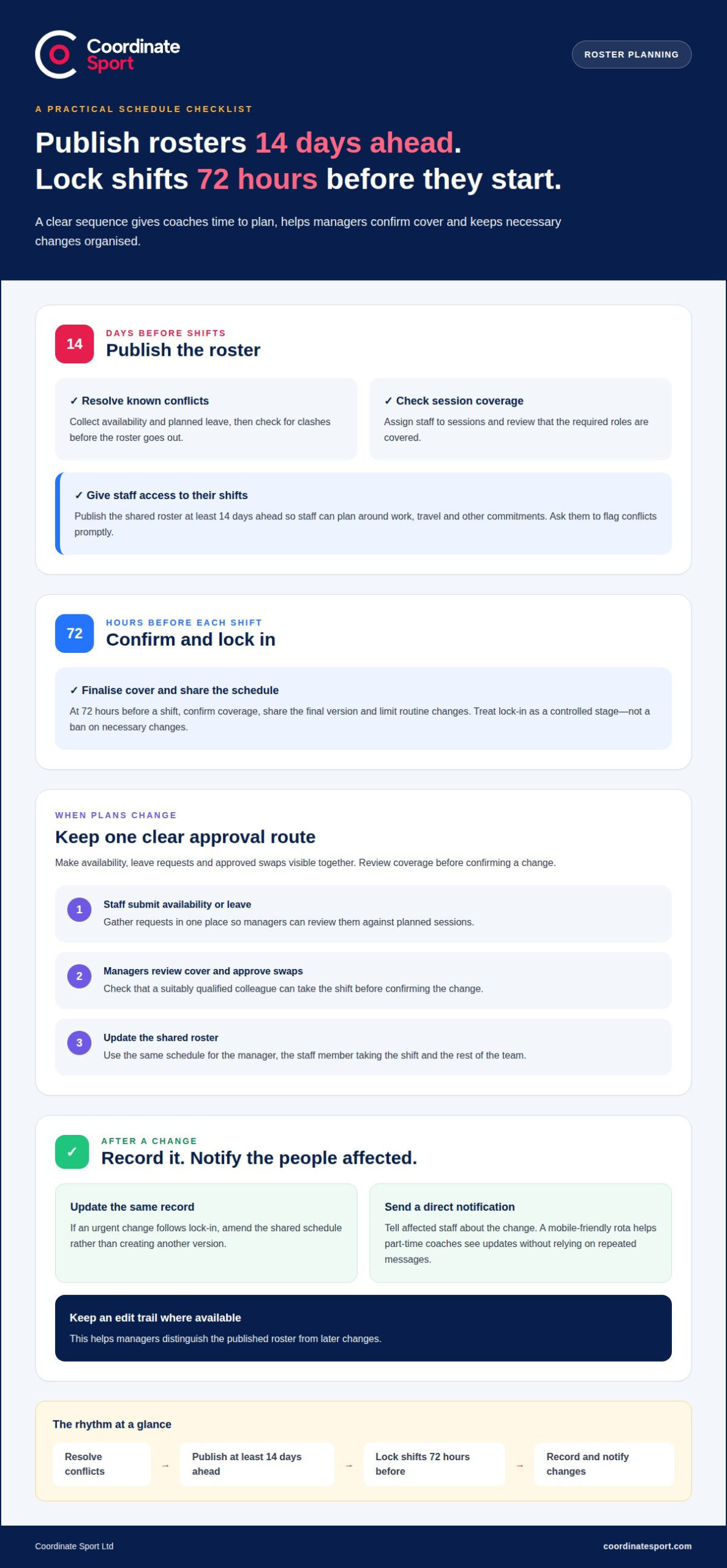
Publish sports facility staff rosters at least 14 days in advance, then lock shifts 72 hours before each shift. These benchmarks give coaches time to plan around work, travel and other commitments. They also create a clear point for managers to finalise cover before sessions begin. Treat the lock-in as a controlled stage, not a ban on necessary changes.
Availability, shift swaps and leave work best through one clear approval process. Staff submit availability or leave, managers review coverage, then approve swaps and update the shared roster. A coach requesting a Saturday morning off, for example, should see whether a suitably qualified colleague can take the shift before the change is confirmed.
Build the rota in stages. First, collect availability and planned leave. Next, assign people to sessions and review role coverage. Publish the roster at least 14 days ahead, then ask staff to flag conflicts promptly. At 72 hours before a shift, lock the schedule and share the final version. If an urgent change follows, update the same record and notify affected staff directly.
- Before publication: resolve known leave and availability conflicts.
- At publication: give each staff member access to their assigned shifts.
- At lock-in: confirm cover and limit routine changes.
- After a change: record the amendment and notify the people affected.
A mobile-friendly rota helps part-time coaches see changes without relying on repeated messages. If a coach swaps a Tuesday session, a shared schedule gives the manager and replacement one updated record. Keep an edit trail where available so managers can distinguish the published rota from later changes.
Choose staff scheduling workflows that make availability, leave requests and approved swaps visible together. That gives managers a practical route from the 14-day publication target to the 72-hour lock-in, while keeping unavoidable changes organised.
Affordability for small coaching programmes
For a small coaching programme, affordability means more than choosing the lowest subscription. Compare the full operating cost with the administration the system could reduce. Track time spent building rotas, reconciling session payments and answering booking queries to establish a practical baseline before comparing options.
List the functions your team actually needs. A programme running weekly football sessions may prioritise staff scheduling, participant registration and fee collection. A seasonal holiday programme may also need course bookings and changing staff allocations. Focus on features that support current delivery and near-term plans.
Compare quotes against the same set of requirements. Record what each quote includes, such as staff access, booking workflows, payment collection, implementation and ongoing support. A tailored platform’s price depends on the requirements and is provided after a quote request; relevant cost factors include the workflows, users and functions needed.
- Admin time: estimate the hours spent on rota changes and payment administration.
- Programme fit: match included functions to your sessions, courses or holiday programme.
- Growth: consider whether the setup can accommodate new activities or additional staff.
- Adoption: assess whether coaches and administrators can use the workflow confidently.
Use a simple comparison worksheet. Put each provider in a column, then list required tasks in rows. Mark whether each task is handled in the system or needs a separate process. If coaches must update a separate spreadsheet after bookings change, include that extra work in your assessment.
Compare the expected value with your programme’s actual capacity. A small team with one administrator may benefit most from reducing repetitive tasks, while a volunteer-led club may prioritise straightforward access and clear session records. Review your comparison when schedules or registration needs change, rather than buying for an imagined future operation.
What are the best staff scheduling software options for sports clubs in the UK?
The right fit depends on how your club organises sessions, staff and changes. A small club running weekly tennis sessions may need a straightforward shared rota. A multi-activity provider may need staffing and participant bookings coordinated together. Compare the workflow, not just the software category.
Consider these three approaches:
- Shared calendar or spreadsheet: suits a small team with stable sessions and one rota owner. Managers update shifts manually, so changes need clear communication.
- Dedicated scheduling tool: centres on staff availability, shift allocation and rota updates. It can suit clubs whose main challenge is coordinating part-time coaches across changing sessions.
- Connected activity platform: links staff planning with session registration and bookings. It may fit providers managing courses, clubs or holiday programmes alongside staffing.
Prioritise mobile access for coaches who need to view a rota away from a desk. Check that managers can quickly move or cancel a session, then notify the affected group. Automated email or text reminders can help parents remember scheduled sessions. These functions make schedule changes easier to communicate than repeated individual messages.
Try a practical comparison using one real week of club activity. Assess each option against the same tasks: add a session, assign a coach, change the time, notify participants and review the final schedule. Note which steps happen in one place and which require manual follow-up. This reveals where coordination work remains.
For a club with a steady timetable, a straightforward rota may be enough. Choose a dedicated scheduling tool when shift allocation and availability are the main pressure points. If booking and staffing need to work together, consider a connected platform. Match the choice to your current workflow and make sure it remains manageable as activities change.
Compare sports scheduling workflows against a typical week at your club, including session changes and participant notifications.
Coordinate Sport: Sports CRM and booking software
Coordinate Sport brings staff planning, activity management and bookings together for sports providers. Its Sports Activity Provider Staffing Application supports staff coordination, while its CRM and booking software handles online registration for sessions, courses, clubs, camps, holiday activity programmes and events.
Coordinate Sport is a natural fit when your programme needs to manage staffing alongside bookings and participant information. Its platform brings relevant operational tools together, helping providers organise activity delivery and customer registration in one setup.
Explore Coordinate Sport Ltd’s options to see how they fit your programme’s scheduling and booking workflows, or contact Coordinate Sport Ltd to discuss your requirements.
Set your next programme up to run smoothly
Choose sports activity staff scheduling software around how your programme operates now, then consider how it can support your next stage of growth. The right setup should help your team coordinate staffing and activity administration without adding unnecessary complexity.
Coordinate Sport brings together CRM and booking software, a Sports Activity Provider Staffing Application and an Activity Management Application. These tools can help providers align staff planning with wider programme operations, from scheduling staff to managing activity administration.
Ready to explore a more joined-up approach for your sports programme? Contact Coordinate Sport Ltd to discuss how its software fits your operational needs. A clear next step can put your team in a stronger position to plan, coordinate and deliver with confidence.
Frequently Asked Questions
What features should sports activity staff scheduling software include?
Prioritise scheduling, digital registers, staff timesheets and clear session records. For example, a club running a weekend tournament can use digital registers to record attendance and timesheets to track staff hours. Coordinate Sport Ltd’s platform also includes bookings, messaging, waiting lists and reporting. Select functions that match your programme’s day-to-day tasks, rather than adding tools your team won’t use.
How much does sports staff scheduling software cost in the UK?
Pro is a tailored package listed as “Let’s Talk”. Compare the monthly charge and transaction fees with the functions and staff access your programme needs before choosing a plan.
Does sports staff scheduling software integrate with payroll, HR and booking systems?
Distinguish built-in functions from connections to separate systems. Coordinate Sport includes online booking and scheduling, and its Pro package includes payroll. The listed features do not specify HR functionality or connections to external payroll or booking systems, so avoid assuming those integrations are available. Map your current process, such as transferring session bookings into staff timesheets, to identify where information needs to flow.