
More features won’t necessarily make your activity programmes easier to run. The right activity provider software fits how your organisation works, from bookings and participant records to staff coordination across sessions and locations. So, which platform will help you manage programmes smoothly as they grow?
If bookings, payments and participant details are spread across disconnected tools, getting a clear view of daily operations can take too much effort. As programmes expand, coordinating teams and tracking performance can become harder too. Comparing feature lists is a useful starting point, but a long list won’t show whether a system supports your actual processes.
This practical buying guide will help you assess activity provider software against your programmes, team and plans. You’ll learn what to look for in booking and registration, online payments, participant management, staff coordination and reporting, and how to weigh those capabilities against your operational priorities. The aim is to connect the work around bookings and delivery, giving you the oversight to make confident decisions as your organisation evolves.
Key Takeaways
- Map where bookings, payments and participant records create extra work across your programmes.
- Trace the customer and participant journey from registration through delivery to identify the workflows your team needs.
- Compare activity provider software by operational fit, usability and oversight, not by the length of its feature list.
- Set essential requirements before evaluating platforms, then plan a rollout around your existing processes and team adoption.
- Revisit your criteria as programmes, participant numbers and staffing needs change, so your systems can keep pace.
Activity provider software: identify the operational problem before comparing tools
Activity provider software helps sports and activity organisations administer programmes, manage customer journeys and oversee delivery. It can bring together tasks such as setting up sessions, taking registrations and payments, organising participant information, coordinating staff and reviewing programme activity. The purpose is not simply to accept bookings. It is to give the people running programmes a clearer way to manage the work around them.
Start by looking at what happens between a customer finding a programme and a participant taking part. If bookings sit in one tool, payments in another and participant details in spreadsheets or inboxes, staff may need to enter the same information more than once. Updates can be missed, and it can be harder to see which records are current or how a programme is running. A connected system can link these operational steps, but it won’t fix unclear responsibilities or inconsistent processes on its own.
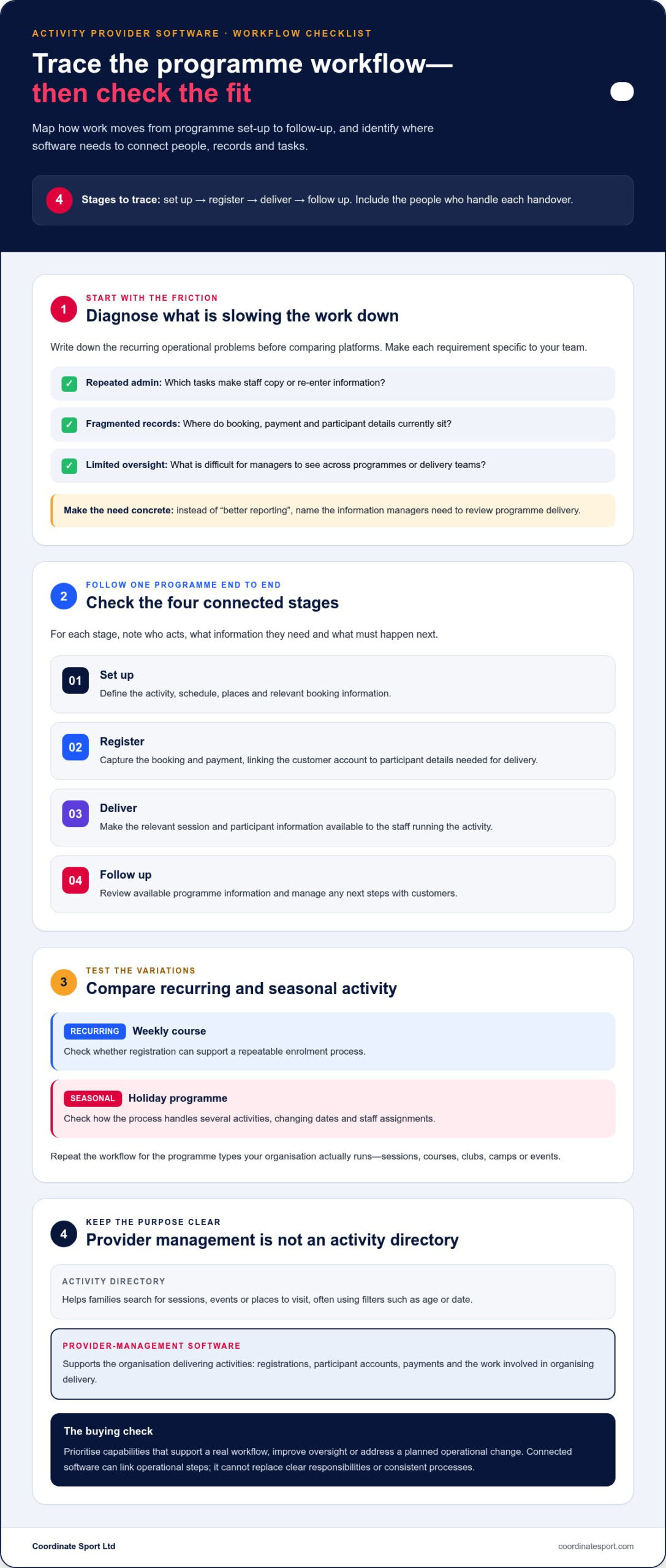
Also distinguish provider-management software from an activity directory. A directory helps families search for sessions, events or places to visit, often using filters such as age or date. Provider-management software is for the organisation delivering the activities. Its focus is administration and oversight, including registrations, participant accounts, payments and the work involved in organising delivery.
Which organisations benefit from activity provider software?
Sports organisations, clubs and activity providers can benefit when they run sessions, courses, camps, holiday programmes or events. The deciding factor is not size alone, but how many processes and people need coordinating. A small club with recurring enrolments may need reliable participant records, whilst a larger organisation running seasonal programmes may also need to manage changing schedules, teams and locations.
Recurring and seasonal activities create different demands. A weekly course needs a repeatable registration process. A holiday programme may involve several activities, changing dates and staff assignments. List the variations your team handles rather than assuming every programme follows the same pattern.
What problems should the software solve first?
Before comparing platforms, write down the operational friction your team encounters repeatedly. Look for duplicated data entry, records split across tools, avoidable follow-up and limited visibility of bookings, participants or staffing. Be specific: “we need better reporting” is less useful than identifying the information managers need to review programme delivery.
Separate immediate needs from optional features. A capability earns its place if it supports a real workflow, improves oversight or addresses a planned operational change. For example, a collaborative knowledge base could help staff document procedures, and Wiki software is one approach to shared documentation. However, it doesn’t replace the booking, participant and delivery-management functions an activity provider needs.
Use this short diagnosis before moving on to a feature comparison:
- Repeated admin: Which tasks require staff to copy or re-enter information?
- Fragmented records: Where do booking, payment and participant details currently sit?
- Limited oversight: What do managers struggle to see across programmes or delivery teams?
These answers define the problem the system must solve. Keep the operational goal in view: software should organise sound processes and make them easier to manage, not stand in for them.
Assess the activity provider software workflows your team needs
Trace the work from the first programme decision to the final follow-up. The aim is to see whether activity provider software supports a joined-up operating process, not just a customer-facing booking form. Include the people who set up activities, manage registrations, coordinate delivery and review results. Their handovers often reveal where a system needs to connect information and tasks.
Map one typical programme from start to finish. For each stage, note who acts, what information they need and what must happen next. A simple sequence might be:
- Set up: define the activity, schedule, places and relevant booking information.
- Register: capture the booking and payment, linking the customer account to the participant details needed for delivery.
- Deliver: make the relevant session and participant information available to the staff responsible for running it.
- Follow up: review available programme information and manage any next steps with customers.
Repeat the exercise for a recurring course and a seasonal event. The differences matter: one may rely on repeat enrolment, whilst another has a fixed delivery window and changing staff assignments. This gives you a practical way to assess how booking, customer records, participant information and operational tasks work together. For a wider view of task management considerations, compare your needs with Forbes’ Best Task Management Software guide.
Connect programme bookings with participant management
Check that the system can represent the mix of sessions, courses, clubs, camps and events your organisation runs. Then follow a booking through the records staff use to prepare for and deliver that activity. Can the customer account and booking be associated with the relevant participant information, without staff maintaining separate versions of the same details? Consider how that structure will support repeat engagement, such as a customer booking another course or registering for a later programme.
Test a realistic example rather than relying on a feature label. Trace a returning customer’s booking and check whether staff can access the participant details and programme context they need. This end-to-end relationship is important when assessing how participant records connect with bookings.
Include staff coordination in the workflow review
Staffing belongs in programme planning, not as an afterthought once registrations are complete. Consider how session assignments are made, how teams can see their responsibilities and how managers track staff deployment across the schedule. If your programmes run across multiple locations, test whether the workflow makes it clear which staff are assigned to each session and where delivery is taking place.
Compare the information used to plan a programme with what staff need during delivery. If schedules change, identify how updates reach the people affected and who maintains the current view. For more complex staffing needs, sports staffing software can help you assess scheduling and team coordination.
Finish by marking each workflow step as essential, useful or unnecessary for your organisation. That gives your comparison a clear test: does the platform carry the right information between booking, participant management and delivery in a way your team can use?
Compare activity provider software by fit, control and visibility
Choose for operational fit, not feature volume. The right system supports your core workflows and gives your team the control it needs as programmes evolve. A comparison is most useful when every option is judged against the same criteria. Set out what your organisation must manage, then separate essential capabilities from preferences that would be useful but aren’t decisive.
Use this framework to compare activity provider software against your operating model. Mark each area as essential, useful or not currently needed, and note any gaps or workarounds.
- Workflow coverage: Can bookings, participant information, payments, staffing and reporting support the tasks your team performs?
- Usability: Can customers complete the booking journey clearly, and can staff find the information they need to act?
- Oversight: Can managers see the programme and operational information required to make decisions?
- Room to scale: Can the system accommodate your planned mix of activities, delivery arrangements and staffing needs?
Integrated software can link these functions in a shared workflow, reducing repeated entry when information passes between teams. Standalone tools may suit organisations with a narrow requirement or established processes they want to keep. The trade-off is how information moves between systems and who maintains it. Don’t assume one platform must cover every task; prioritise the connections that remove friction from your operation.
Compare booking, payment and customer-management capability
Evaluate registration, customer accounts, branded booking journeys and payment collection as one experience. Check how the booking flow handles your actual programme formats, from a single event to a course with repeat sessions. Then consider what happens after registration: can staff relate the customer account and payment to the relevant participant and activity? Assess the booking journey alongside your wider operational needs.
Test representative cases, including a new customer booking an event and a returning customer registering a participant for another programme. Look for clear steps and useful records, not just a polished booking page. The goal is a journey that works for customers and leaves staff with information they can use.
Compare reporting and operational oversight
Start with the decisions your organisation needs to make. Managers may need a view of activity across programmes, whilst funders or commissioners may require relevant programme data. Assess whether reports help answer those questions and whether staff can use the information to identify where attention is needed. Reporting should support real management decisions, not simply add more figures to review.
Compare how booking and delivery information feeds into oversight, and whether the resulting view is useful across your activity types. This helps distinguish reporting that supports action from data collection that offers little practical value. Use the same decision-led test when exploring sports activity reporting software in greater depth.
Plan a practical activity provider software evaluation and rollout
A clear evaluation starts before you compare platforms or move records. Map how your organisation currently sets up programmes, handles registrations and payments, coordinates staff and reviews delivery. This baseline helps you spot adoption risks early, avoid carrying unnecessary steps into a new system and judge whether a proposed workflow will work in practice.
Use a staged process:
- Map current processes. Record the handovers, tools and information used from programme planning through delivery and follow-up.
- Gather requirements. Ask programme, administration and staffing colleagues where delays, duplicated work or missing information affect their tasks.
- Prioritise needs. Separate requirements that affect core delivery from preferences that would be helpful but aren’t essential.
- Evaluate realistic scenarios. Walk through a typical recurring programme and a seasonal activity, involving the people who would use each workflow.
- Plan records and adoption. Decide what information needs to move, who will prepare it and how the team will learn the agreed processes.
Create a requirements list based on real delivery
Make the list specific to your operation: programme types, registration steps, payment tasks, staff coordination and the information managers need to review. Rank each requirement by how often it arises, its effect on delivery and its importance to customers. Include reporting audiences too. A management team, funder or commissioner may need different information, so state the decision each report should support.
Invite representatives from programme delivery, administration and staffing to review the priorities together. Their perspectives can expose a gap between how a process looks on paper and what staff need to do during a busy delivery period. Use agreed scenarios to test shortlisted options consistently, and capture unresolved questions rather than relying on assumptions.
Prepare the team for adoption
Assign clear ownership for setup, daily administration and staff communication. Decide who maintains programme information, who checks records and how schedule changes are shared. Then agree consistent ways of working before transferring information. Clear ownership helps prevent different teams from creating conflicting versions of the same process.
Plan learning around real tasks, such as setting up a programme, finding participant details or reviewing activity information. Set practical measures before rollout: fewer repeated tasks, clearer responsibility for updates or improved access to the information managers need. Review these measures after adoption and adjust processes where the intended improvement hasn’t taken hold.
Keep the rollout plan proportionate to your programmes, records and team capacity. The right sequence and pace depend on those needs, so focus on readiness rather than an arbitrary deadline. To explore an activity management and booking platform against your requirements, view Coordinate Sport’s platform.
Choose activity provider software that supports your next stage of growth
The right platform depends on how your organisation delivers activity today and what you expect to manage next. A club running regular sessions may prioritise straightforward registration and reliable participant records. A provider combining courses, camps and events may need a broader view of bookings, payments, staff coordination and programme performance. An integrated platform is especially relevant when these tasks involve shared information and handovers between teams.
As participant numbers, programme formats or staffing needs change, revisit your criteria. A system that works for one activity type may become harder to manage when you add seasonal programmes or more delivery locations. Focus on whether workflows remain clear and managers can still see the information they need, rather than assuming growth simply calls for more features.
Match the platform to your organisation’s programme mix
Check that the platform can support the activities you deliver, whether sessions, courses, clubs, camps, holiday programmes or events. Consider how the customer journey works across that mix: branded booking portals give customers a recognisable place to register, whilst customer accounts can support repeat engagement. Online payments and fee collection should fit naturally into the booking and registration process, so the organisation can manage enrolment and payment alongside customer and participant information.
Then assess what happens behind the booking page. If staff have to recreate registration details elsewhere to prepare for delivery, the customer-facing journey may be smooth whilst the operational workflow remains fragmented. Look for a setup that connects booking activity to the information staff and managers use, with processes that work for your team.
Turn your comparison into a confident next step
Before making a decision, return to your priority list. Which current tasks cause the most friction? Which capabilities are essential to customers and delivery teams? What information do managers, funders or commissioners need to review? Clear answers help you judge platform fit against real operating needs, rather than being swayed by a long feature list.
For broader delivery needs, include staffing coordination and reporting in the same evaluation. Coordinating teams across programmes and locations can be as central to smooth operations as managing registrations. Reporting can give management teams a clearer view of activity and provide relevant data for funders and commissioners. These capabilities matter most when they address real responsibilities in your organisation.
Coordinate Sport brings online booking and registration, customer and participant accounts, payments, staffing coordination and reporting together in a platform for sports and activity organisations. If that connected approach aligns with your priorities, explore Coordinate Sport’s activity management platform.
Set your next stage in motion
Turn your priorities into a practical standard for how programmes should run. Use it to assess whether activity provider software will support the organisation you’re building, not just the processes you have today. The right choice should help your team adapt as delivery changes, without adding complexity for its own sake.
Coordinate Sport brings sports CRM, activity management and online booking together, with specialist workforce coordination for sports activity providers. Its reporting is designed for management teams, funders and commissioners, helping organisations connect delivery with the information they need to oversee it. Consider how these capabilities align with the way your team works and the growth you’re planning.
Explore Coordinate Sport’s activity management platform to see how its booking, staffing and reporting tools align with your operational priorities. Explore Coordinate Sport’s activity management platform.
Frequently Asked Questions
Is activity provider software only for sports organisations?
No. Activity provider software can be relevant to organisations that manage sports and other organised activity programmes. The key is whether the platform supports the activities, customer journeys and delivery responsibilities you need to manage. For example, a provider running recreational sessions and seasonal events may need different booking and staffing workflows from a club offering one regular course. Assess software against your operating model, not the label alone.
Can activity provider software manage both regular sessions and one-off events?
Yes, a suitable platform can support recurring activities as well as one-off events. Check how each format is set up and how customers register. For example, a term-long course may need customers to select from scheduled sessions, whilst an event may have a single date and registration window. Reviewing both scenarios can show whether staff can manage different programme formats without relying on separate processes for each one.
How much does activity provider software cost?
There isn’t one standard price: costs depend on the platform’s subscription structure and the capabilities your organisation needs. Compare the full charging model, not just the headline subscription. Consider how payment collection, usage levels, setup or onboarding, and any additional fees affect the overall cost. For a fair comparison, estimate your likely requirements and booking activity, then assess each option against the same assumptions.
Can activity provider software replace spreadsheets and separate booking tools?
It can reduce reliance on separate tools if it supports the tasks you currently manage in them. Start by listing what each spreadsheet or booking system is used for, such as tracking registrations, maintaining customer details or preparing programme information. Then check whether the platform covers those needs and whether the relevant records can be moved accurately. Your organisation may still have a reason to retain particular tools or processes.
What information should we prepare before adopting activity provider software?
Prepare an inventory of your programme types, current booking steps, customer and participant records, payment tasks, staff responsibilities and reporting needs. Identify where each record is held and who maintains it. For example, note which details are needed to register a participant and which information staff need to organise delivery. This groundwork helps your team decide what to transfer, what to tidy up first and who should oversee each part.
Can activity provider software help demonstrate programme performance?
Yes. Reporting can help present programme information to managers, funders and commissioners. First, decide what each audience needs to understand and what decisions the information should inform. A management team may need an operational overview, whilst a funder may require data linked to programme delivery. Check that reports reflect the information your organisation records, and agree how staff will keep those records accurate and consistent.