

The class price isn’t always the full amount a parent pays. The classforkids pricing structure vs subscription comparison comes down to how each charge is applied: a booking fee may be added at checkout, while a transaction fee relates to processing subscription payments.
It’s easy to focus on the advertised session price and overlook how the payment method affects the total. This matters to families budgeting for activities and to clubs choosing how to collect fees and explain charges clearly.
This guide explains how booking fees and subscription-payment transaction fees work, what they mean for parents and how to compare them in practice. It also covers how payment schedules can affect the first collection, helping you assess which arrangement suits your activity programme.
Key Takeaways
- Separate a booking fee passed on at checkout from a transaction fee linked to subscription payments to see how each affects parents.
- Compare the full cost of a class across its payment schedule, not just the advertised session price.
- Find out how a subscription starting on the first of the month may affect payment for the rest of the current month.
- Use the plan, trial and cancellation details to assess the practical commitment, as well as the headline price.
- Check how booking, registration and payment processes fit your programme before choosing a system.
How much does ClassForKids charge per month or per year?
Separate the cost of a class from the price of the booking platform. The class fee is not a software subscription price. For parents, the amount due can also depend on how the club collects fees and whether it adds a booking charge at checkout.
To assess the total commitment, start with the class price and the number of sessions in the programme. This helps families compare the advertised session cost with the full programme cost. It doesn’t account for any separate booking fee or payment transaction charge.
A monthly amount needs a different comparison. Check the payment schedule, the dates it covers and any additional charge shown before completing a booking. A parent paying monthly may see instalments, while a club may collect subscriptions on set dates. Compare all payments across the class period, rather than treating one monthly collection as the full cost.
The start date can also affect the first collection. If subscription payments begin on the first day of a month, a club may ask a parent or carer to add a payment covering the rest of the current month. This can make the first payment different from later scheduled collections. When reviewing a payment record, distinguish this initial period from the ongoing subscription.
Before deciding what an annual or monthly figure means, compare these items:
- Payment timing: note whether collection is monthly or covers the programme period.
- Booking charge: check whether a fee appears separately at checkout and who pays it.
- First collection: account for any covering payment for the rest of the current month.
This breakdown puts the figures in context: booking and transaction charges are separate considerations. Read the booking amount alongside its payment schedule, then compare the total commitment with the sessions being booked.
Does ClassForKids charge a commission or transaction fee on bookings?
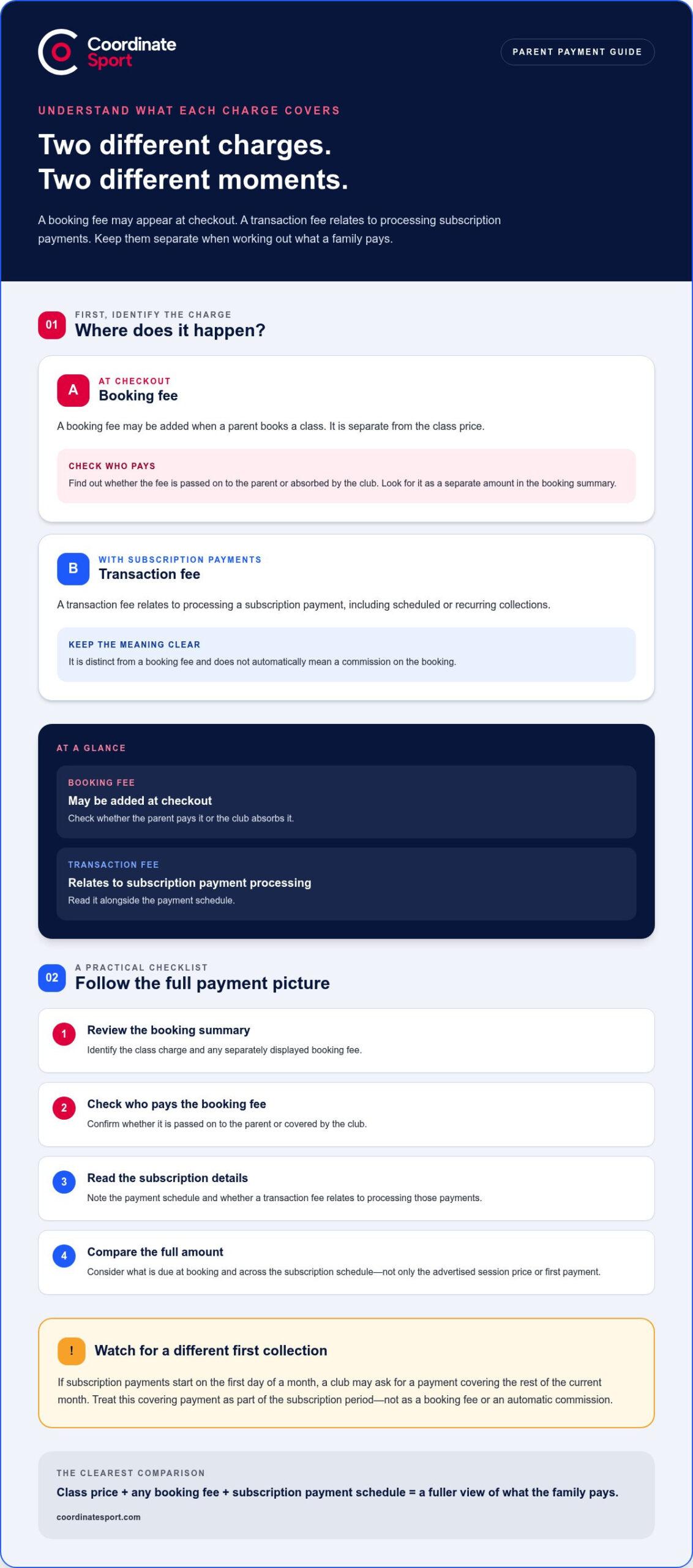
A booking fee and a subscription transaction fee describe different charges. A booking fee may be added at checkout, while a transaction fee relates to processing a subscription payment. In the ClassForKids pricing structure versus subscription comparison, identify what each charge covers before assessing its effect on families.
“Commission” suggests a share of a booking’s value. That differs from a transaction fee, which is associated with processing a payment. Don’t assume a fee is a commission simply because it appears alongside a booking. Check whether it is described as a booking charge, a payment-processing charge or part of the class cost.
For parents, the practical question is what appears in the amount due. A fee added at checkout increases the payment for that booking. A transaction fee connected with subscriptions relates to the scheduled payment method. Keep the class charge, booking fee and subscription payment distinct when comparing totals or explaining charges to families.
Use this checkout sequence to understand the difference:
- Review the booking summary: identify the class charge and any separately displayed booking fee.
- Check who pays: establish whether the booking fee is passed on to the parent or absorbed by the club.
- Read the subscription details: identify whether a transaction fee relates to processing recurring payments.
- Compare the final amount: assess what the parent pays at booking and across the subscription schedule.
Timing can affect the first subscription collection. If payments start on the first of the month, a club may ask a parent or carer to add a payment covering the rest of the current month. Treat this covering payment separately from any booking fee: it relates to the subscription period and does not automatically represent a commission on the original booking.
For example, a parent booking a course could pay a booking fee at checkout, then make subscription payments on the club’s chosen schedule. These are separate payment events. The checkout amount shows charges associated with registration; later collections reflect the subscription arrangement and its payment processing. Comparing both stages gives a clearer picture than looking only at the first payment.
Clubs can help parents understand the difference by describing charges clearly. State what a booking fee covers and show subscription timing separately in the booking journey. Avoid grouping distinct charges under a vague label. Clear descriptions make it easier to explain the total due, answer questions about the first collection and distinguish a booking charge from a transaction fee.
A booking fee may be added at checkout, while a transaction fee relates to processing subscription payments. They are distinct charges and are not necessarily commissions.
A transaction fee relates to processing scheduled subscription payments and is separate from a booking fee.
What features are included in each ClassForKids pricing plan?
Separate the tools included in a plan from the way parents pay. A subscription describes a payment arrangement; it doesn’t, by itself, explain which software features a club can use. For a useful ClassForKids plan comparison, match each feature to the named plan and its stated terms instead of assuming that monthly payments unlock a particular tool.
Start with the booking journey. Check whether a plan covers publishing activities, taking registrations, managing participant details and handling online payments. These are separate tasks, even if families experience them as one booking. A clear feature list helps a club assess whether its registration process fits its programme.
Next, consider the activities the club runs. A provider offering sessions, courses, clubs, camps, holiday programmes or events may need different booking arrangements for each. Compare the plan’s stated capabilities with a real example, such as enrolling a participant in a course and recording their details. This reveals gaps more clearly than comparing plan names alone.
Use this checklist to assess each plan without mixing features and fees:
- Booking: identify the activities that can be listed and booked online.
- Registration: check how participant information and account details are managed.
- Payments: distinguish payment collection features from any fee charged per transaction.
- Customer experience: establish what parents see during booking and registration.
- Administration: note which tasks staff can manage within the plan.
Then test a typical scenario. Imagine a family booking a child onto a club session, entering participant details and paying online. Trace each step and note which plan feature supports it. If the organisation also runs a holiday programme, repeat the exercise for that activity. This turns a general feature list into a practical assessment of fit.
Keep recurring payments separate in your comparison. A plan may describe available tools, while a subscription describes payment timing. Where applicable, a transaction fee concerns payment processing, not access to a particular feature. Put these items in separate columns so you don’t mistake a payment method for a software capability.
Finally, compare the plan terms with your operating priorities. Mark each feature as essential, useful or unnecessary, then link it to a real task your team performs. This makes plan differences easier to evaluate without relying on assumptions about what a label includes. It also helps you explain the choice to staff and parents using specific booking and registration examples.
Does ClassForKids offer a free trial or free plan
A free trial and a free plan are different offers. A trial provides access for a limited period, while a free plan offers ongoing access under defined conditions. A ClassForKids pricing comparison should distinguish both from paid subscriptions, rather than treating monthly billing as proof of free access.
For a trial, focus on what happens before and after access ends. Identify which features are available, whether the trial ends automatically and what happens to bookings or account data afterwards. For example, a club testing registration may need to know whether it can complete a sample booking and review the parent checkout journey.
A free plan needs a different assessment. Check whether it limits activities, registrations, staff users or payment functions. These are examples of conditions that can shape a free tier, and they are not the same as a paid plan’s subscription schedule. Compare what work the club can complete, not just the word “free”.
Use this checklist to evaluate the offer and its impact on your operations:
- Access period: distinguish time-limited trial access from ongoing free access.
- Included functions: map booking, registration and payment tasks to the available access level.
- Restrictions: identify any limits that would affect a real class or course workflow.
- End of access: understand what happens to account access and existing booking information.
- Payment charges: separate any payment-processing costs from the software access arrangement.
Then test the offer against a real operating example. Map the steps for listing a session, accepting a participant’s registration and taking payment. If the trial lets you complete the whole sequence, it can reveal more than a brief look at the settings. If a free plan has limits, consider whether they interrupt the same workflow.
Also distinguish a trial from a low-cost or introductory subscription. A paid subscription remains chargeable, even if its first payment differs from later collections. Likewise, a free account does not automatically mean every booking or payment-related cost disappears. Compare access, billing and payment processing separately.
To make a decision, list the essential tasks your team needs to complete and compare each with the access terms. A trial is useful when it lets you test the booking journey before committing. An ongoing free plan is useful only if its limits still support the club’s registration and payment needs. This gives a clearer answer than relying on the offer label alone.
What are the contract terms, cancellation rules, and minimum commitment for ClassForKids
A monthly subscription doesn’t automatically mean a month-to-month contract. Billing frequency and minimum commitment are separate terms. For a ClassForKids agreement, read the contract for its initial term, renewal process, notice period and cancellation method. Those clauses determine the length of the commitment and what action ends the agreement.
Start with the contract’s duration clause. It should say whether the agreement runs for a fixed term or continues until cancellation. Then read the renewal wording. For example, an agreement may renew automatically unless notice is given by a stated deadline. Together, the renewal clause and notice deadline show when the organisation must act to avoid another term.
Read the cancellation rules carefully. Identify how to submit a cancellation, when it takes effect and whether charges continue during a notice period. These details matter if a club stops running a course before its next renewal date. Ending activity bookings and ending a software agreement are separate actions, so don’t assume cancelling one automatically ends the other.
Use this checklist to review the contract before accepting its terms:
- Initial term: find the start date and the length of the first commitment.
- Renewal: establish whether the agreement renews automatically or requires a new acceptance.
- Notice: record the required method and deadline for cancellation.
- Final charges: identify whether fees remain due during any notice period.
- Data and access: review what happens to account access and records after termination.
Next, compare the contract with the payment schedule. Monthly collections may simply divide a longer commitment into instalments. Conversely, a fixed-term agreement may have a payment schedule that does not match its end date. Put the agreement start, renewal point, notice deadline and final payment on one calendar to spot any mismatch.
For example, if a club changes its programme mid-term, the question is not only whether it can stop taking bookings. It must also understand whether the software agreement continues, when cancellation takes effect and what payments remain due. This distinction prevents an operational decision from being mistaken for contract cancellation.
Before signing, summarise the key clauses in plain language for whoever is responsible for renewals. Record the cancellation method and deadline alongside the agreement documents. The ClassForKids contract terms, not the word “subscription”, determine the minimum commitment and cancellation outcome. Use the summary to plan renewals and avoid missing a notice requirement.
Coordinate Sport: Sports CRM and booking software
Coordinate Sport Ltd provides sports CRM and booking software for organisations managing activity programmes. Its platform brings online registration, payments and participant accounts into a coordinated workflow.
It suits providers managing sessions, courses, clubs, camps, holiday activity programmes or events who want a clearer view of bookings and administration. The Activity Management Application and Sports Activity Provider Staffing Application also support activity operations and staff coordination.
As you compare booking charges with subscription payment processes, consider how your system handles the full journey, from registration to fee collection. Coordinate Sport Ltd brings these workflows together with branded customer booking sites and management reporting.
Contact Coordinate Sport Ltd to discuss your booking and activity management needs.
Set your next season up for smoother operations
Your comparison of the ClassForKids pricing structure vs subscription payments can inform a wider decision: choose a setup that supports how your programme operates, not just how it collects fees. Consider how bookings, participant information and staff coordination work together as your activities develop.
Coordinate Sport Ltd offers Sports CRM and booking software, a Sports Activity Provider Staffing Application and an Activity Management Application. Set out your operational priorities, then explore how these tools can support your programme. Get in touch with Coordinate Sport Ltd to discuss your requirements.
Discuss class pricing with Coordinate Sport Ltd and explore a practical way to organise your activity operations. Take the next step with a clear view of what your programme needs to run well.