

The fastest route to going live may be a coaching website with online booking, rather than a youth team app. A booking-led platform helps families find activities and register, while a team app focuses on coordinating an existing squad. The best TeamUp alternatives for youth sports coaching depend on which task you need to solve first.
If you’re setting up a new programme, getting activities in front of families and opening registration may be the priority. If you’re already running a team, organising schedules and keeping players and parents informed may matter more. Choosing the wrong type of tool can add setup work without fixing the task that’s slowing you down.
This comparison explains what coaching websites with online booking and youth sports team-management apps are built to do, and which can help you get started sooner. You’ll also find comparison criteria and a practical decision guide to match a platform to your coaching operation.
Key Takeaways
- Choose a coaching website with online booking when your priority is publishing activities and opening registrations to families.
- Choose a team-management app when the main task is coordinating an established squad’s schedules, availability and attendance.
- Compare tools by the full workflow they support, from player registration and payments to parent communication and team organisation.
- To get live faster, focus on the option that fits your immediate needs and requires fewer steps to set up your sessions or team.
- Use the decision guide to weigh scheduling, membership management and booking needs before selecting a platform.
Coaching websites and online booking
A coaching website with online booking helps families find an activity, choose a session and register in one clear journey. For example, a parent can view a weekly football session, check the details and book without relying on separate messages. The organiser can then manage registrations and payments alongside activity information.
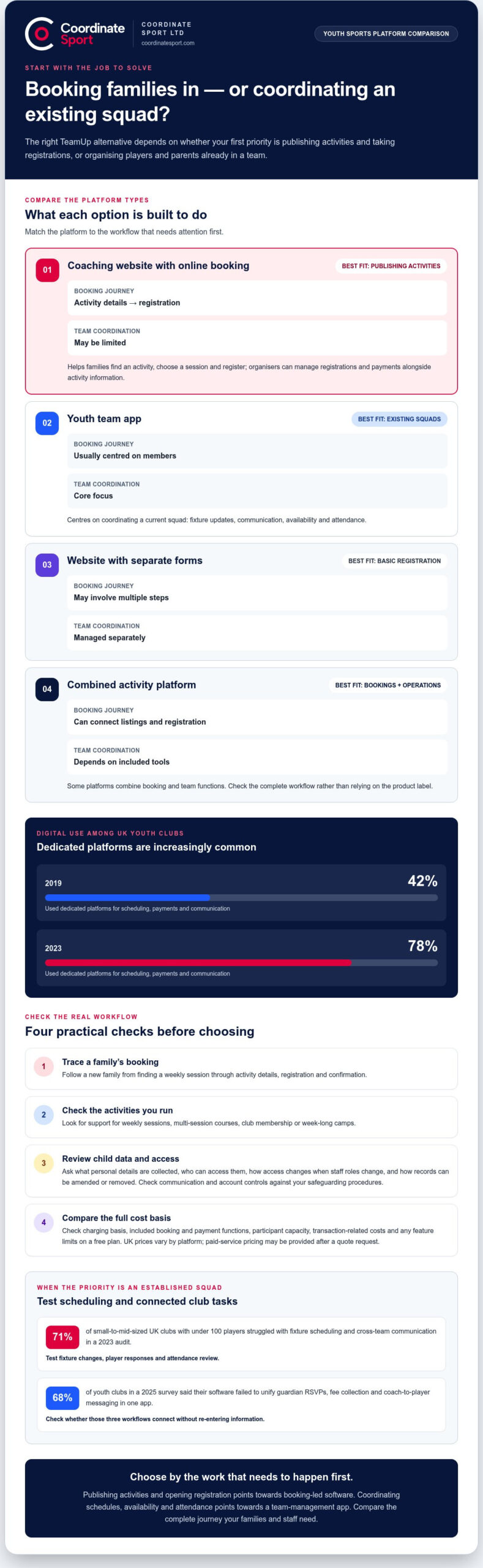
Digital use is already common among UK youth clubs: 78% used dedicated platforms for scheduling, payments and communication in 2023, compared with 42% in 2019. Those figures point to a clear operational shift. A website-led booking system suits providers who need to publish activities and turn interest into registrations, rather than only coordinate an existing squad.
Map the booking journey before choosing a platform. List each step, from the first page a family sees to the confirmation they receive. Then check whether the system supports the activities you run, such as weekly sessions, multi-session courses, club membership or week-long camps. Consider how members connect with the programme and whether parents can manage participant details through one account.
When comparing TeamUp alternatives for youth sports coaching, distinguish a booking website from a team communication app. A booking website presents activities to prospective participants and supports registration; a team app generally centres on coordinating current players and families. Some platforms combine these functions, so compare the full workflow rather than the product label.
Assess child data and safeguarding with practical questions. Identify what personal details the platform collects, who can access them, how access is managed, and how records can be changed or removed. Consider whether its communication and account controls fit your safeguarding procedures, and whether staff can manage access when roles change.
There is no single UK price for these alternatives, and free-plan availability depends on the platform and its feature limits. Compare the charging basis, included booking and payment functions, participant capacity, and any transaction-related costs. For a paid service, pricing depends on the case and is provided after a quote request.
Use this comparison to narrow down TeamUp alternatives for youth sports coaching by focusing on the booking journey your families need.
| Option | Best fit | Booking journey | Team coordination |
|---|---|---|---|
| Coaching website with booking | Publishing activities | Activity details to registration | May be limited |
| Youth team app | Existing squads | Usually centred on members | Core focus |
| Website with separate forms | Basic registration needs | May involve multiple steps | Managed separately |
| Combined activity platform | Bookings and operations | Can connect listings and registration | Depends on included tools |
Trace a real example, such as a new family booking a weekly session, from finding the activity through registration and follow-up.
Youth sports team-management apps
Team apps organise an existing squad, from fixture updates to parent responses. Compare how each handles communication, attendance and administration across the club.
Youth team app options
Compare alternatives by the job they prioritise: team communication, fixture coordination or wider club administration. A communication-led app puts updates and replies at the centre; a scheduling-led option focuses on events and availability. A broader platform may connect several tasks, but it is a good fit only if coaches and parents can manage their regular workflows without switching between separate tools.
Scheduling, availability and attendance
For a team with changing fixtures, check how quickly a coach can publish a change and collect player responses. Look for a clear distinction between unavailable, attending and awaiting a reply, then consider how the coach reviews attendance before selection. A 2023 UK audit found that 71% of small-to-mid-sized clubs with under 100 players struggled with fixture scheduling and cross-team communication. Test those exact tasks in your shortlist.
Registration, payments and membership
Registration and membership features matter when a club needs more than a fixture diary. Trace a new player’s journey from submitting details to joining the right team, then assess how the club records membership and collects fees. Some tools centre on squad coordination, while broader administration systems connect participant records and payment workflows. Compare how each handles a returning member, not just a new registration.
Support for teams, coaches and age groups
Multiple teams need clear role separation. Check whether an administrator can organise age groups, assign coaches and give parents relevant updates without exposing unrelated team information. Consider how coaches access their own squad’s information while club administrators oversee the organisation across teams. A tool built around one team may be simpler for a single squad; a club-wide structure is more useful when responsibilities span age groups.
For calendars, email, messaging apps and governing-body systems, compare the actual connection each alternative provides. Check whether fixture changes flow into calendars, whether messages stay attached to the right team, and whether results or registrations require re-entering information. In a 2025 survey, 68% of youth clubs said their software failed to unify guardian RSVPs, fee collection and coach-to-player messaging in one app. Use those three workflows as a practical test.
A 2024 survey in England found 78% of youth sports clubs cited scheduling, payment collection and guardian communication as main reasons volunteers leave roles. Shortlist apps by testing one fixture update, one parent response and one attendance review. For clubs comparing wider sports activity management workflows, judge whether team coordination needs to connect with registrations and participant records.
What are the best Teamup alternatives for youth sports teams in the UK?
The best alternative depends on whether your priority is club administration, squad communication or activity bookings. Compare each option against a real workflow, such as adding a player, sharing a fixture change and recording attendance.
Use these categories to build a shortlist. They describe different platform types, not a universal ranking: the right fit depends on what your club needs to manage first.
| Alternative type | Best suited to | Compare first |
|---|---|---|
| Club-management platform | Several squads and shared administration | Membership records, roles and reporting |
| Team communication app | Updates for coaches, parents and players | Replies, team separation and message history |
| Fixture and availability tool | Match schedules and attendance responses | Fixture changes, availability and attendance views |
| Booking-first platform | Open sessions and new registrations | Activity listings, registration and payment steps |
| Calendar and spreadsheet setup | A small club with straightforward needs | Manual updates, access and duplicate entry |
A club-management platform can suit an organisation running several age groups. For example, an administrator may oversee membership records while coaches manage their own squads. Check whether the system separates responsibilities clearly and whether parents can find the right team without searching through unrelated information.
A communication app centres on updates between coaches, parents and players. It can be a practical fit when the main task is sharing a venue change or collecting match availability. A fixture-focused tool puts schedules and attendance at the forefront instead. Clubs using unified scheduling platforms with automated fixture imports reduced administrative errors by 68% within a year and improved parent satisfaction by 45% within a year.
A booking-first platform serves a different need: accepting registrations for activities, rather than coordinating only existing members. A club running both weekly sessions and seasonal trials should test whether families can find the right activity and submit details in one flow. A calendar-and-spreadsheet setup may handle a single team’s basic diary, but staff have to manage updates and records separately.
Before choosing, write down the three tasks causing the most friction. Then test them in each shortlisted option: publish a fixture, collect availability and add a new member. Record how many steps each task takes, who can complete it, and where information must be entered twice.
Choose the platform that addresses your club’s biggest operational gap without adding unnecessary administration. A single-team club may favour a focused scheduling tool; a multi-team organisation may need stronger role and membership management.
How do Teamup alternatives compare for team scheduling, availability and attendance tracking?
Compare the full match-day workflow, not just the calendar view. Test how each option handles a fixture change, player responses and the coach’s final attendance list. This shows whether scheduling and attendance are managed together or require separate updates.
Start with the fixture change
Use a realistic example, such as moving Saturday football training to a different pitch. Check how the organiser edits the event, tells the relevant team and records the new venue. A shared calendar may display the change, while a team-focused app may also include it in squad updates. The key distinction is how easily families can find the latest details.
Next, review availability. A coach needs to distinguish players who can attend from those who cannot, and identify replies still outstanding. Check whether responses appear beside the fixture or in a separate message thread. If a parent updates their availability, see whether the revised answer is clear to the coach preparing the session.
Check attendance records
Availability indicates who expects to attend; an attendance record shows who arrived. Test both stages using a training session: collect responses beforehand, then mark attendance at the venue. Some tools treat these as separate tasks, so look for a clear way to compare expected and actual attendance. That distinction helps coaches follow up on a missed session without relying on memory.
| Tool type | Scheduling strength | Availability view | Attendance task |
|---|---|---|---|
| Shared calendar | Displays fixtures and changes | May need separate responses | Can require manual recording |
| Team communication app | Shares updates with a squad | Responses can sit with messages | Check whether attendance is distinct |
| Club-management platform | Can organise events across teams | May connect responses with records | Review reporting and team access |
For a club with several squads, test whether a fixture change reaches the correct age group without confusing other teams. For a single squad, focus on whether a coach can update the venue and see responses in one straightforward view. These scenarios show where each type of tool fits.
Run a practical comparison
During a trial or demonstration, follow the same match scenario in every shortlisted option. Create an event, change its venue, collect availability, then record who attended. Note any duplicate entry, unclear status or extra message required. This gives your club a direct comparison based on its own fixture routine, rather than a feature list alone.
Choose the system that makes event details, player responses and attendance records easiest for your coaches to use. If an update requires several separate actions, include that workload in your decision alongside the calendar features.
Attendance tracking can matter beyond day-to-day logistics: team sports are linked to fewer mental health difficulties among young people. Student-athletes often have improved focus, attendance and academic performance, and are reported to be more likely to earn higher GPAs and attend college. These points make participation worth considering alongside calendar features.
Sports Coaching Group says a young man with significant mental health needs and SEND attended all sessions supported by its programme (100%). Compare whether attendance records distinguish missing replies from missed sessions, so staff can interpret participation accurately without assuming software alone produces attendance or wellbeing outcomes.
Which alternatives include player registration, payments and membership management?
TeamUp alternatives differ in how much of a player’s journey they manage. A team communication app may organise existing members but leave registration and fee collection elsewhere. A club-management platform can connect player records, membership status and payments. Compare the complete process, not just a feature list.
Start with a new-player example. A parent finds a club, submits the player’s details, selects an age group and completes registration. Check whether the platform connects those steps or sends families between a form, an email and a separate payment process. Fewer hand-offs can make it easier for administrators to see which registrations are complete.
Next, test how the system handles a returning member. Can an administrator update contact details, move the player to another squad and review their membership status? A form designed only for new participants may not suit a club that maintains records across changing seasons. Look for a clear record that authorised staff can find and update.
Compare payment collection separately. Check whether families can pay during registration and whether administrators can identify completed and outstanding payments. Consider the club’s actual model: seasonal membership, a course fee or payment for individual sessions. The best fit depends on whether the platform supports the club’s collection process without creating duplicate records.
| Platform type | Player registration | Payment handling | Membership records |
|---|---|---|---|
| Team communication app | May be separate | May require another process | Often centred on team access |
| Registration and booking platform | Central to the workflow | Can connect payment with sign-up | Check ongoing member management |
| Club-management platform | Can support club-wide records | Can connect collections and records | Designed for broader oversight |
| Forms and spreadsheets | Manual entry or separate forms | Often tracked separately | Requires ongoing administration |
Before selecting an alternative, test three cases: a new player joining, a returning member renewing and a family paying for a course. Record where each person’s details are stored, how staff identify payment status and whether the right team receives the registration. This can reveal gaps that a messaging-focused demonstration might miss.
Choose a team app if coordination is the main need and existing registration processes work well. If sign-ups, member records and fee collection create separate administrative tasks, prioritise a platform that connects those workflows. For a club comparing registration and payment management, explore online booking and registration.
Streamlining sports administration, a connected platform may help reduce the administrative burden, but the right workflow still depends on who participates and what records staff need. Local community programmes often organise inclusive, no-commitment sessions for various age groups, while regional sports initiatives design projects focused on the inclusion of vulnerable persons, families and communities. These examples underline why a club should check whether its registration process fits its participants, rather than assume every activity uses a standard membership model.
By early 2024, 65% of UK-based professional and semi-professional teams in national sports frameworks had adopted integrated team management applications, an increase of 40% since 2020. Other sports bodies have different structures depending on their local governance, regional committees and member club counts. These figures provide context, not proof that a particular platform handles registration, payments and membership well; test those workflows directly.
Coordinate Sport: Sports CRM and booking software
Coordinate Sport Ltd is a practical next step when your organisation needs bookings and activity administration alongside team coordination. Its Sports CRM and booking software supports online booking and registration for sessions, courses, clubs, camps, holiday activity programmes and events. Online payments and participant account management bring key administration into the same operational workflow.
Choose this approach if you manage several activity types and need a clear view of registrations, rather than a tool focused only on fixtures and attendance. The Activity Management Application and Sports Activity Provider Staffing Application also support broader activity operations. They are designed for providers organising programmes, not for delivering coaching services.
Explore how Coordinate Sport Ltd could support your activity administration at coordinatesport.com.
Choose the system that supports your next season
Make your decision based on the work your organisation needs to manage next, not a long feature list. When comparing TeamUp alternatives for youth sports coaching, identify the process that most needs to improve, then map how staff and families will use the chosen system through a full season.
Coordinate Sport offers Sports CRM and booking software, an Activity Management Application and a Sports Activity Provider Staffing Application. These tools suit organisations that need to manage activity operations alongside bookings and registrations, rather than focus solely on team communication.
Set out the tasks you want to bring together, such as organising activity administration and registrations, before deciding on your next step. Contact Coordinate Sport to discuss options for your organisation.
Choose with your team’s day-to-day work in mind to build a smoother season.
Frequently Asked Questions
Which youth sports coaching apps support team communication, messaging and announcements?
Youth team-management apps are the category to compare for squad messaging and announcements. Look for separate spaces for each team, so a coach can share a pitch change with the right parents without sending it club-wide. Check whether announcements are distinct from chat and whether members can find earlier messages. For example, a cancelled training update should be easy to spot, while routine discussion stays in the team conversation.
How much do Teamup alternatives cost in the UK, and are there free plans?
There is no single UK price. Free-plan availability depends on the platform and its feature limits; paid pricing depends on the case and is provided after a quote request.