

A longer feature list does not necessarily mean a better fit. When comparing CoursePro alternatives for multi-activity providers, focus on how each platform handles your mix of activities, customers and booking patterns. Compare family accounts, online registration, memberships, scheduling, payments and recurring or block bookings before you decide.
If you manage different programmes, a straightforward booking process matters as much as day-to-day oversight. Compare how each system fits your operation, where its limitations could affect your team and how its fees work. Look beyond headline features to the workflows your staff and customers use.
This guide covers the practical differences to help you make a confident decision. You’ll see what to assess in family accounts, customer experience, online registration, memberships, scheduling and repeat bookings. Use these criteria to focus on capabilities that support your programmes now and as they grow.
Key Takeaways
- Compare how platforms connect family accounts and participant records so customers can manage bookings with less friction.
- Assess the full online joining journey, including registration, payment collection and how memberships fit your programmes.
- Map activities, venues and schedules together to see whether a system supports the way your operation runs.
- Look beyond headline fees: understand how payment arrangements and booking patterns affect the overall fit.
- Check how recurring and block bookings are handled, then weigh whether an integrated sports management platform suits your next stage of growth.
Family accounts and customer experience
For a multi-activity provider, one household might manage several participants across swimming, football and holiday programmes. Compare CoursePro alternatives by tracing a family’s journey from account creation to updating participant details and booking another activity. A clear portal should distinguish each child’s profile, chosen session and booking status. Test the same journey on a phone and computer, as parents may switch devices while organising family commitments.
Use HomePortal as a practical comparison point, not just a feature name. Map how a parent finds each child, checks their information and moves between activities. A family with siblings in different sessions should be able to identify the right participant before booking. Check how the system handles shared contact details alongside participant-specific information, such as relevant skills or activity history. Clear records help staff and families avoid mixing up children’s details.
Test account activation from the customer’s perspective. Start at the invitation or registration page, then note each step needed to activate an account, add a participant and reach the booking screen. Check what information the process requests, whether the instructions are clear and how it handles an existing parent profile. Also assess how staff resolve duplicate records without creating another account or losing useful participant details.
Ask how the provider controls access to family and participant records, manages consent records and supports clear processes for retaining or removing information. Safeguarding features should help manage appropriate staff access, accurate emergency contacts and traceable permissions. Assess these controls against your organisation’s own data-handling and safeguarding procedures. A convenient portal does not replace them.
Before switching, compare the written contract, cancellation terms and support arrangements. Identify how notice, data access, migration, renewal and termination work, then compare the cancellation process with your customer policies. Check the agreement for support channels and escalation routes, so staff know how to raise operational issues during a busy booking period.
- Test the same family journey across activities, participants and devices.
- Use a sibling booking example to assess HomePortal’s clarity.
- Record every activation step, including handling an existing account or duplicate profile.
- Review access controls, consent records and safeguarding processes together.
- Compare contract, cancellation, data migration and support terms before changing systems.
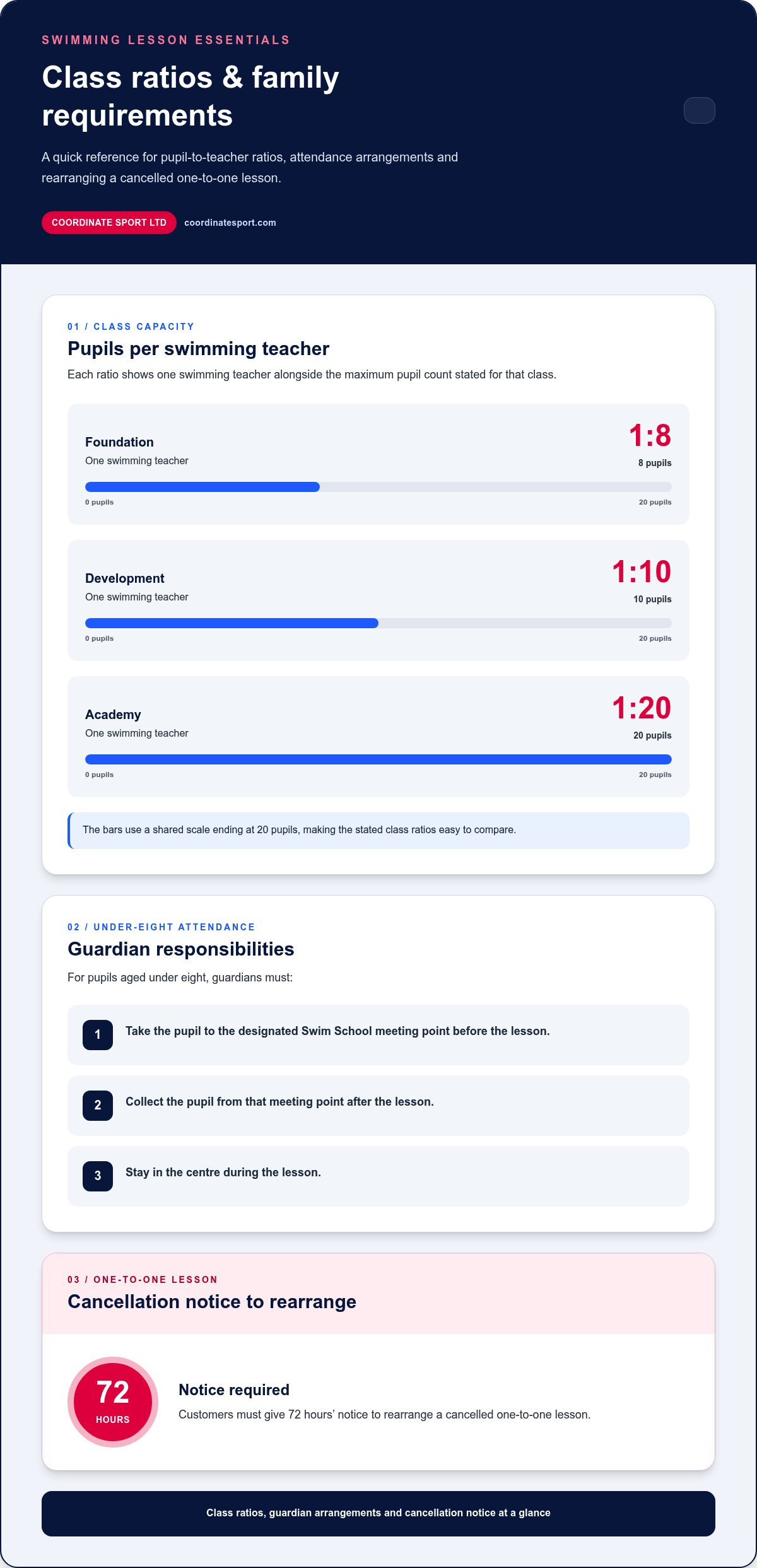
Families may also need to assess how class arrangements and collection duties fit their booking experience. Better swimming lessons have an average Foundation class ratio of one swimming teacher to eight pupils, a Development class ratio of one swimming teacher to ten pupils, and an Academy class ratio of one swimming teacher to twenty pupils. For pupils aged under eight, guardians must take them to the designated Swim School meeting point and collect them there after the lesson, and guardians must stay in the centre during the lesson. For a cancelled one-to-one lesson, customers must give 72 hours’ notice to rearrange it. Make these practical requirements clear when families select sessions and plan attendance.
Online joining, payments and memberships
Online registration should take a customer from finding a session to completing a booking without unnecessary back-and-forth. Compare each platform using the same example: a parent enrolling a child in swimming. Follow the journey from the activity listing through participant details, membership choices, payment and confirmation. Note which fields are required, whether the next step is clear and how errors are corrected. A well-structured process helps customers register and gives staff useful booking records.
CoursePro alternatives vary in how they connect bookings, payments, attendance and customer communications. Test each function against a real scenario, such as a new member joining a weekly class. Can staff see booking and payment status alongside attendance? Can customers find their confirmation later? These checks show whether the system connects the customer journey or leaves staff reconciling separate records.
Look closely at memberships, especially if your organisation runs different activities. Compare how each platform presents membership options, links them to eligible sessions and handles customers joining more than one programme. A family might want a club membership alongside a swimming course. Check that customers can understand what each option covers before paying, and that staff can identify the relevant membership when managing bookings.
Review payment collection from both sides of the transaction. Follow the customer’s payment journey, then check the resulting record from the staff view. Find where payment status appears, how staff identify incomplete transactions and how customers access booking details afterwards. Payment options should fit the registration process, not leave staff matching disconnected records manually. Assess the workflow, not just the payment label.
Communications shape the experience after registration. Look for clear booking confirmations, useful session information and a straightforward way to share changes with customers. Then test attendance recording: can staff find the right participant and mark attendance without searching through unrelated activity records? A swimming provider, for example, may need a quick view of the class list before a session. Compare the steps, the clarity of each record and how easily staff can act on it.
- Trace one customer journey from activity selection to confirmed registration.
- Check how membership choices relate to eligible sessions and bookings.
- Compare payment records with the booking and attendance views staff use.
- Assess whether customer communications provide useful, accessible booking details.
For a practical comparison, map your current joining process against the online booking journey and identify where registration, payment and customer records need to connect.
Membership administration should also account for changes that affect a member’s ability to attend. Sports course members who cannot continue using facilities for medical reasons do not have to give cancellation notice if they provide a letter from their current care provider as proof. Check that staff can identify the required evidence and clearly record the membership change, separately from routine booking and payment updates.
Multi-activity scheduling across venues
A provider running courses at a leisure centre and holiday activities at a school needs schedules that reflect both locations. Compare how each alternative organises activities, venues, instructors and available spaces. Staff should be able to distinguish a swimming course from a football club and see where each session takes place. Clear venue labels and useful filters make the right schedule easier to find during daily planning.
Which booking software supports camps, clubs, courses and one-off activities? Choose a system that lets you set up each format and manage its sessions, capacity, venue and customer bookings together. Test a holiday camp, a weekly club and a single event to see whether one operating view can support each programme.
Scheduling should help staff spot conflicts before they disrupt delivery. Compare a venue’s room allocation with the activity timetable and staff assignments, then see how a session change appears in the overall schedule. A useful system makes affected bookings and updates easier to coordinate, rather than leaving teams to reconcile separate calendars. Check whether managers can review activity progress across venues while retaining the detail needed for a specific course.
Assess each system with a realistic weekly plan: a course at a leisure centre, a club at a community hall and a camp at a school. Check how staff find the right venue and session details, and spot clashes between activities or resources. Test how the schedule shows cancellations, changes and replacement sessions. The key question is whether it supports the way your team coordinates locations and programmes, not how many features it lists.
How can a multi-activity provider migrate bookings, customer records and schedules from CoursePro? First, group the information into those categories and map each field to its destination in the new system. Review active bookings and upcoming sessions first, as they affect immediate delivery. Match customer records carefully, resolve duplicates and compare the transferred schedule with the working timetable before relying on it.
- List each activity, venue, staff assignment and resource your timetable must coordinate.
- Test a course, club, camp and one-off event against the same scheduling workflow.
- Check how staff find conflicts, changes and affected bookings across locations.
- Group migration data into bookings, customer records and schedules before mapping fields.
- Compare the migrated timetable with the operational schedule before using it for planning.
For a practical comparison, build a sample schedule using your own activities and venues. Follow a booking from its activity listing to the venue timetable, then assess how clearly staff can track delivery and progress.
Payment options and fees
Compare the full payment journey, not just the checkout screen. For a customer joining a swimming course, trace registration, payment, confirmation and the resulting transaction record. Then check the same record from the staff view. This shows whether staff can connect a payment to the right customer, activity and booking without relying on separate notes.
CoursePro alternatives for multi-activity providers may structure charges differently. Compare subscription, booking-based, payment-processing and optional service charges in each platform’s terms. Separate software fees from those applied by a payment provider, and note which party charges each one. A platform quote depends on the organisation’s requirements and follows a quote request. Relevant factors include the programmes, payment workflows and functionality needed.
Build a cost comparison around your registration patterns. List the activities customers book, whether they pay individually or through a membership, and how staff handle refunds or changes. Record each charge category and what triggers it, such as a completed booking or payment transaction. This makes it easier to compare like with like and understand how booking volumes or payment methods may affect total costs.
Which alternatives integrate with UK payment providers, accounting tools and marketing platforms? Integrations vary, so compare each system’s documented connections with the providers and tools your organisation uses. Check what information passes between systems, such as payment status or customer details, and whether staff need to export or re-enter records.
Test the payment workflow using a sample activity before switching. Register a participant, complete a payment and find the transaction linked to the booking. Then follow a cancellation or refund through the process and see how staff can view the record. This practical test can expose manual steps that a feature list may miss.
Before committing, review the contract and payment terms together. Identify the billing basis, additional charge categories, how changes to the arrangement are handled and what happens when the agreement ends. Compare the terms with your expected mix of courses, clubs and events. A low headline charge may not reflect the full operating cost if essential workflows require separate tools or repeated administration.
- Trace one payment from registration through to the staff transaction record.
- Separate platform charges from payment-provider charges in your comparison.
- Match charge categories against your activities and payment workflows.
- Check integrations against the UK payment, accounting and marketing tools you use.
- Test a booking, payment and refund workflow before making a decision.
Recurring and block bookings
Recurring bookings suit activities with a regular timetable, such as weekly tennis lessons. Block bookings let customers reserve a defined series of sessions. Compare how each system shows the booking, its dates and the participant’s place. Customers should be able to tell whether they are choosing one lesson, a recurring slot or a course block. Clear distinctions help prevent mistakes.
Test a recurring booking from the customer’s and staff’s perspectives. Follow a participant as they select a class, review its schedule and complete the booking. Then check how staff see that participant across future sessions. Assess how the platform handles a change to one date, a missed session or a customer leaving the activity. These scenarios show whether routine adjustments are manageable without disrupting other bookings.
For a block booking, use a course with several scheduled lessons as your example. Check how the system displays session dates, available places and booking status. Then consider a customer joining after the block has started. The platform should make the remaining sessions and payment arrangement clear before the customer commits. Staff also need a clear view of who is booked onto each date, not just the overall course total.
Capacity management matters for both booking types. Imagine a club with limited places and customers booking recurring sessions alongside one-off events. Compare how availability changes after each registration and how staff identify a full session. Check what happens when a booking changes, so availability and customer records remain aligned. A simple test across two activities can show whether the system distinguishes their spaces and booking rules.
Use these checks to compare alternatives:
- Can customers distinguish a single session from a repeating booking or block?
- Are dates, remaining sessions and booking status easy to understand?
- Can staff view participant bookings by session and activity?
- How are changes, cancellations and available places reflected?
- Can customers find the correct booking details after registering?
Before switching, map existing recurring bookings and course blocks to the new system’s booking structure. Compare a sample timetable with customer records, then review the resulting session lists. This helps teams identify mismatches before they affect customers. For a closer look at managing online bookings for courses and sessions, explore the booking options that fit your programme structure.
Coordinate Sport: Sports CRM and booking software
Coordinate Sport brings together sports CRM and booking software for organisations managing varied activity programmes. Online booking and registration covers sessions, courses, clubs, camps, holiday activity programmes and events. The Activity Management Application and Sports Activity Provider Staffing Application support operational work, while online payments and customer and participant accounts connect bookings with administration.
Consider this option if your comparison shows that different activity types, bookings and participant records need to work together. Branded customer booking sites give families a way to access programmes, while reporting helps teams review information for management, funders and commissioners. The right fit depends on which workflows your organisation needs to connect.
Explore whether Coordinate Sport fits your operation by visiting coordinatesport.com.
Turn your comparison into a confident next step
Choose based on the operating model you want to build, not just the system you are replacing. Your assessment of CoursePro alternatives for multi-activity providers can shape a practical transition plan: identify the workflows to connect, decide what staff and customers need from the experience, then use those priorities to guide your next discussion.
Coordinate Sport offers sports CRM and booking software, an Activity Management Application and a Sports Activity Provider Staffing Application. These tools may suit organisations looking to bring activity administration and staffing workflows together. Explore how they fit the processes your team wants to improve.
Contact Coordinate Sport to discuss your options and consider how a more connected approach could support your programmes. Choose the direction that gives your team a clear platform for its next stage of growth.
Frequently Asked Questions
Which platforms support multiple venues, instructors, timetables and capacity limits?
Sports activity management platforms that combine booking and staff coordination can support this workload. Coordinate Sport offers an Activity Management Application and a Sports Activity Provider Staffing Application to coordinate staff across activity locations. Compare platforms by modelling a real timetable: assign instructors and venues, set session capacity, then make a change and see how it affects bookings. This reveals whether operational details remain aligned as programmes shift.